# MCP

## 1. What is Proxyman MCP?

**Proxyman MCP** (Model Context Protocol) is a feature that enables AI assistants (Claude, Cursor, and other MCP-compatible tools) to directly interact with the Proxyman macOS app. It allows AI to inspect HTTP traffic, create debugging rules, and control Proxyman - all through natural language conversations.

The architecture consists of two components:

* **MCP HTTP Server** - Runs inside Proxyman app on localhost with token-based authentication
* **MCP CLI Server** - A stdio-based MCP server that AI tools connect to, which forwards commands to Proxyman

#### ✅ Example Prompts

* Show me the last 10 API requests to api.example.com
* Create a breakpoint for all POST requests to /api/users
* Export the failed request as a cURL command
* Enable SSL proxying for \*.stripe.com
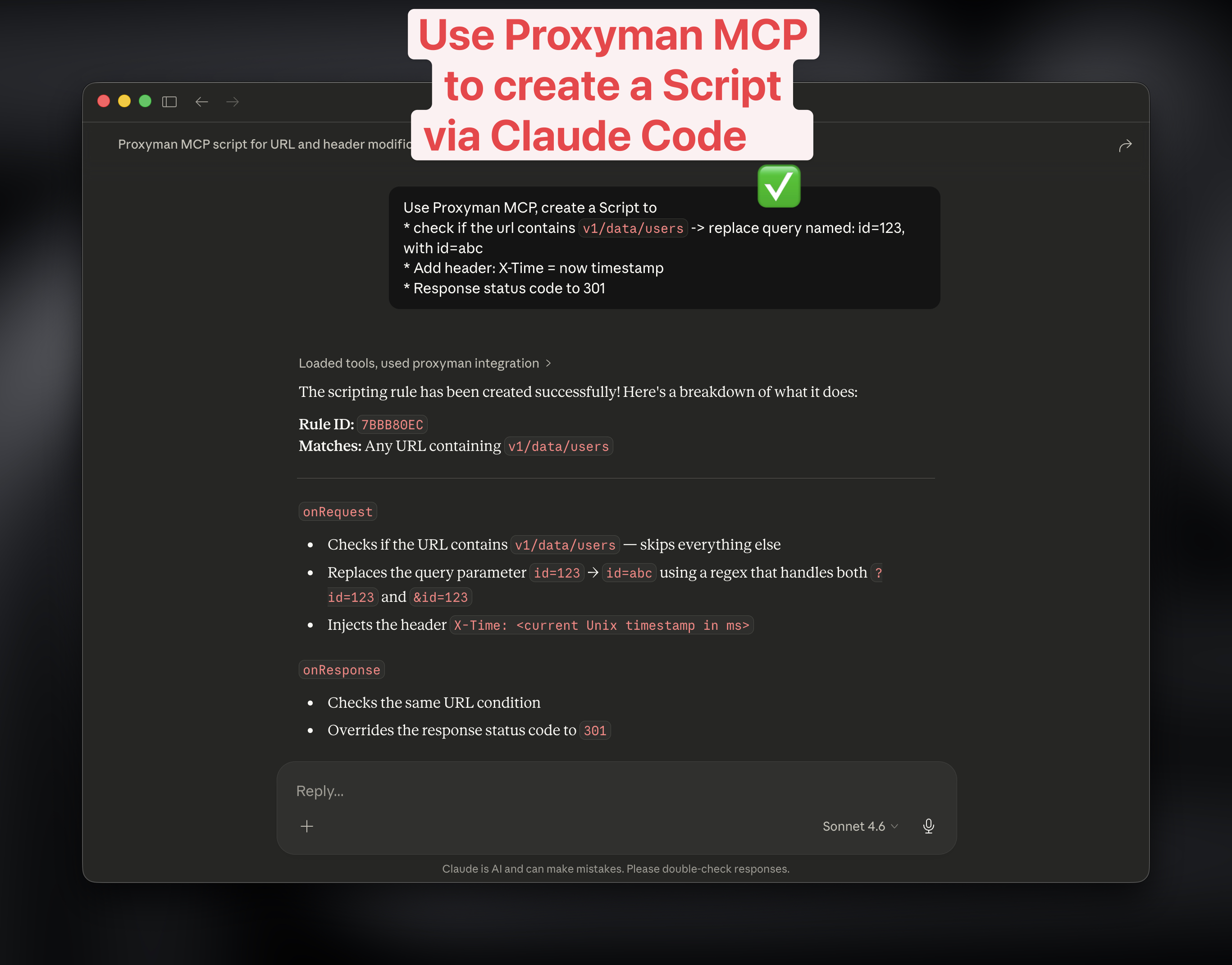
* Create a new Script to change the status code, headers, body.
* Create Map Local, Breakpoint Tools with given URL

<figure><img src="https://1856518738-files.gitbook.io/~/files/v0/b/gitbook-x-prod.appspot.com/o/spaces%2F-LlPt_6BePnJ3oK3saP1%2Fuploads%2FqQcsFS5hz30hI5PCINtN%2FScreenshot%202026-03-16%20at%2011.20.29.jpg?alt=media&#x26;token=7094ae92-e967-4a5f-b6e9-084de3f203d8" alt="Use Claude Code to create the Script"><figcaption></figcaption></figure>

## 2. Benefits

<table><thead><tr><th width="229.90625">Benefit</th><th>Description</th></tr></thead><tbody><tr><td><strong>AI-Powered Debugging</strong></td><td>Ask AI to analyze captured traffic, find specific requests, or explain API responses</td></tr><tr><td><strong>Hands-Free Rule Creation</strong></td><td>Create breakpoints, map local/remote rules through conversation</td></tr><tr><td><strong>Faster Workflow</strong></td><td>Export cURL commands, filter flows, and manage sessions without switching context</td></tr><tr><td><strong>Secure by Design</strong></td><td>Localhost-only server with per-session token authentication</td></tr><tr><td><strong>IDE Integration</strong></td><td>Works seamlessly with Cursor and other MCP-compatible tools</td></tr></tbody></table>

## 3. How to add Proxyman MCP

1. **Enable MCP in Proxyman**
   * Open Proxyman → Settings → MCP Tab
   * Toggle **Enable MCP Server to start the MCP Server**
2. **Configure your MCP client** (e.g., Cursor, Claude Desktop)
3. Add Proxyman MCP to your Agents:

#### Codex

* Production Version:

```bash
codex mcp add proxyman -- "/Applications/Proxyman.app/Contents/MacOS/mcp-server"
```

* Setapp Version:&#x20;

```bash
codex mcp add proxyman -- "/Applications/Setapp/Proxyman.app/Contents/MacOS/mcp-server"
```

#### Claude Code

* Production Version:

{% code overflow="wrap" %}

```bash
claude mcp add proxyman --transport stdio -- "/Applications/Proxyman.app/Contents/MacOS/mcp-server"
```

{% endcode %}

* Setapp Version:&#x20;

{% code overflow="wrap" %}

```bash
claude mcp add proxyman --transport stdio -- "/Applications/Setapp/Proxyman.app/Contents/MacOS/mcp-server"
```

{% endcode %}

#### Manual

Depend on what your AI Agents are, you have to edit the Agent Settings, to use Proxyman MCP. Here is the sample setting.json:

* Production Version:

```json
{
  "mcpServers": {
    "proxyman": {
      "command": "/Applications/Proxyman.app/Contents/MacOS/mcp-server"
    }
  }
}
```

* Setapp Version

```json
{
  "mcpServers": {
    "proxyman": {
      "command": "/Applications/Setapp/Proxyman.app/Contents/MacOS/mcp-server"
    }
  }
}
```

4. **Start using Proxyman MCP**

* Ensure Proxyman is running
* Ask your AI assistant to interact with Proxyman.

## 4. Available Tools

#### Read-Only Tools

| Tool                     | Description                                                                                                      |
| ------------------------ | ---------------------------------------------------------------------------------------------------------------- |
| `get_version`            | Returns Proxyman version and build number                                                                        |
| `get_proxy_status`       | Returns recording state, proxy port, and SSL proxying status                                                     |
| `get_flows`              | Lists captured HTTP/HTTPS flows with optional filters (`limit`, `host_filter`, `method_filter`, `status_filter`) |
| `get_flow_detail`        | Returns full details of a specific flow including headers, body preview, query params, and cookies               |
| `list_rules`             | Lists all debugging rules (breakpoints, map local, map remote, blacklist)                                        |
| `get_ssl_proxying_list`  | Returns SSL proxying include/exclude domain lists                                                                |
| `get_certificate_status` | Returns root certificate installation status                                                                     |

#### Write Tools

| Tool                    | Description                                             | Required Params      |
| ----------------------- | ------------------------------------------------------- | -------------------- |
| `create_breakpoint`     | Creates a breakpoint to pause/inspect matching requests | `url` (pattern)      |
| `create_map_local`      | Returns custom responses for matching URLs              | `url` (pattern)      |
| `create_map_remote`     | Redirects requests from one URL to another              | `from_url`, `to_url` |
| `create_blacklist`      | Blocks requests matching a URL pattern                  | `url` (pattern)      |
| enable\_scripting\_tool | Create Script                                           |                      |
| `enable_ssl_proxying`   | Enables HTTPS decryption for a domain                   | `domain`             |

#### Session Control

| Tool               | Description                                    |
| ------------------ | ---------------------------------------------- |
| `clear_session`    | Clears all captured flows from current session |
| `toggle_recording` | Starts or stops traffic recording              |

#### Flow Operations

| Tool               | Description                                                                                                         |
| ------------------ | ------------------------------------------------------------------------------------------------------------------- |
| `export_flow_curl` | Exports a captured request as a runnable cURL command                                                               |
| `filter_flows`     | Advanced filtering with multiple criteria (url, host, method, status, headers, body) supporting AND/OR combinations |

#### App Control

| Tool            | Description                      |
| --------------- | -------------------------------- |
| `open_proxyman` | Launches Proxyman if not running |
| `quit_proxyman` | Quits the Proxyman app           |

***

## Changelogs

MCP v3 (Proxyman macOS ≥ 6.8.0)

| Name                           | Description                                                                                                                            |
| ------------------------------ | -------------------------------------------------------------------------------------------------------------------------------------- |
| get\_version                   | Get the current Proxyman macOS app version and build number                                                                            |
| get\_proxy\_status             | Get current proxy status including recording state, port number, and SSL proxying status                                               |
| get\_flows                     | Get recent HTTP/HTTPS flows from Proxyman's active session data source                                                                 |
| get\_flow\_detail              | Get detailed information about a specific flow including headers, body, query params, and cookies                                      |
| list\_rules                    | List all active debugging rules (breakpoints, map local, map remote, blacklist, scripting, dns spoofing, network condition, whitelist) |
| get\_ssl\_proxying\_list       | Get the current SSL Proxying configuration including enabled status and domain lists                                                   |
| create\_breakpoint             | Create a new breakpoint rule to pause and inspect/modify requests or responses matching a URL pattern                                  |
| create\_map\_local             | Create a Map Local rule to return a custom response for matching requests                                                              |
| create\_map\_remote            | Create a Map Remote rule to redirect requests from one URL to another                                                                  |
| create\_blacklist              | Create a Blacklist rule to block requests matching a URL pattern                                                                       |
| create\_scripting\_rule        | Create a Scripting rule with custom JavaScript to modify requests/responses                                                            |
| enable\_ssl\_proxying          | Enable SSL Proxying for a specific domain to decrypt HTTPS traffic                                                                     |
| clear\_session                 | Clear all captured flows from the current session                                                                                      |
| toggle\_recording              | Start or stop recording HTTP traffic                                                                                                   |
| export\_flow\_curl             | Export a captured HTTP request as a cURL command                                                                                       |
| filter\_flows                  | Filter captured HTTP/HTTPS flows using advanced filter criteria                                                                        |
| get\_certificate\_status       | Get the current status of Proxyman's root certificate                                                                                  |
| install\_certificate           | Install and trust the Proxyman root CA certificate                                                                                     |
| uninstall\_certificate         | Remove the Proxyman root CA certificate from the Keychain                                                                              |
| inject\_terminal               | Launch a terminal app with Proxyman proxy environment variables injected                                                               |
| get\_terminal\_manual\_command | Get a bash source command for manually setting proxy environment variables                                                             |
| answer\_setup\_question        | Answer setup questions about capturing HTTPS from iOS, Android, browsers, etc.                                                         |
| search\_docs                   | Search the built-in Proxyman setup and troubleshooting doc index                                                                       |
| list\_setup\_workflows         | List the supported setup workflows Proxyman MCP can guide users through                                                                |
| list\_popular\_workflows       | List popular setup workflows using Proxyman's curated fallback ranking                                                                 |
| open\_proxyman\_screen         | Open a specific Proxyman guide or setup screen in the macOS app                                                                        |
| run\_guided\_setup             | Run a one-click automation in Proxyman for browsers or Android emulators                                                               |
| list\_reverse\_proxies         | List configured Reverse Proxy entries                                                                                                  |
| create\_reverse\_proxy         | Create a Reverse Proxy entry for localhost or custom local port routing                                                                |
| generate\_code                 | Generate code from a captured HTTP flow in 18+ languages/frameworks                                                                    |
| create\_dns\_spoofing          | Create a DNS Spoofing rule to redirect a hostname to a different IP address                                                            |
| list\_dns\_spoofing            | List all DNS Spoofing rules and their enabled status                                                                                   |
| update\_dns\_spoofing          | Update an existing DNS Spoofing rule                                                                                                   |
| get\_external\_proxy           | Get the current External Proxy (upstream proxy) configuration                                                                          |
| set\_external\_proxy           | Configure an External Proxy setting for a specific protocol kind                                                                       |
| toggle\_no\_caching            | Toggle the No Caching feature (strips cache-related headers)                                                                           |
| inject\_electron               | Launch an Electron app with Proxyman proxy configuration injected                                                                      |
| open\_proxyman                 | Launch the Proxyman macOS application                                                                                                  |
| quit\_proxyman                 | Quit the Proxyman macOS application                                                                                                    |

### MCP v2  (Proxyman ≥ v6.7.0)

* Built-in knowledge base covering iOS, Android, browsers, terminal, VPN, localhost, and third-party libraries
* New commands: answer\_setup\_question, search\_docs, list\_setup\_workflows, open\_proxyman\_screen, run\_guided\_setup, create\_reverse\_proxy
* MCP resources and prompt templates for chat clients
* Reverse proxy create/list support

### Security

* The server binds to `127.0.0.1` only (no network exposure)
* Per-session cryptographic token stored in `~/Library/Application Support/com.proxyman.NSProxy/mcp-handshake.json`
* The handshake file has `0600` permissions (owner-only access)
* Sensitive data (auth tokens, passwords, API keys) is automatically redacted in responses
